
Αφαιρέστε το άτομο από το Photo Online Δωρεάν με AI
Διαγράψτε εύκολα άτομα από το φόντο, διαγράψτε ανεπιθύμητα άτομα από φωτογραφίες με το εργαλείο αφαίρεσης προσώπων AI. Δεν απαιτείται εγγραφή, άμεσα αποτελέσματα.
Click to upload or drag image here
Κανόνας εικόνων: 1 πίστωση σας επιτρέπει να επεξεργαστείτε 3 εικόνες
Supported formats: PNG, JPG, JPEG, WEBP
Maximum file size: 10MB
Μετά τη μεταφόρτωση, μπορείτε να επισημάνετε μη αυτόματα τις περιοχές ατόμων που θέλετε να αφαιρέσετε από τη φωτογραφία
Πώς να αφαιρέσετε ένα άτομο από τη φωτογραφία
Αφαιρέστε ένα άτομο από μια φωτογραφία με 3 απλά βήματα
Μεταφόρτωση εικόνας
Ανεβάστε τη φωτογραφία που θέλετε να επεξεργαστείτε. Υποστηρίζει μορφές JPG, PNG και WEBP.
Σημειώστε το άτομο
Χρησιμοποιήστε το εργαλείο πινέλου για να επισημάνετε το άτομο που θέλετε να αφαιρέσετε από τη φωτογραφία.
Λήψη αποτελεσμάτων
Το AI επεξεργάζεται την εικόνα σας και αφαιρεί το άτομο. Κατεβάστε την καθαρή φωτογραφία σας αμέσως.
Γιατί να επιλέξετε το εργαλείο αφαίρεσης ατόμου AI
Το καλύτερο δωρεάν διαδικτυακό εργαλείο για να αφαιρέσετε άτομο από τη φωτογραφία
Ακρίβεια με τεχνητή νοημοσύνη
Η προηγμένη τεχνολογία AI εντοπίζει και αφαιρεί με ακρίβεια άτομα από τις φωτογραφίες, διατηρώντας παράλληλα την ποιότητα του φόντου. Η αφαίρεση ατόμου από τη φωτογραφία δεν ήταν ποτέ ευκολότερη.
Δωρεάν & Διαδικτυακά
Εντελώς δωρεάν στη χρήση. Χωρίς λήψεις, χωρίς συνδρομές. Αφαιρέστε άτομο από τη φωτογραφία στο διαδίκτυο δωρεάν στο πρόγραμμα περιήγησής σας.
Δεν απαιτείται σύνδεση
Ξεκινήστε αμέσως να αφαιρείτε άτομα από τις φωτογραφίες. Δεν απαιτείται δημιουργία λογαριασμού ή σύνδεση.
Έξοδος υψηλής ποιότητας
Διατηρήστε την αρχική ποιότητα εικόνας. Το εργαλείο αφαίρεσης ατόμου AI εξασφαλίζει επαγγελματικά αποτελέσματα κάθε φορά.
Γρήγορη επεξεργασία
Αφαιρέστε ένα άτομο από μια φωτογραφία σε δευτερόλεπτα. Γρήγορη επεξεργασία AI για άμεσα αποτελέσματα.
Προστατεύεται το απόρρητο
Οι φωτογραφίες σας επεξεργάζονται με ασφάλεια και διαγράφονται μετά την επεξεργασία. Εγγυημένο πλήρες απόρρητο.
Δείτε το Magic
Δείτε τα εκπληκτικά αποτελέσματα της τεχνολογίας αφαίρεσης ατόμου με τεχνητή νοημοσύνη


Αφαίρεση Προσώπου Ταξιδιωτικής Φωτογραφίας
Αφαιρέστε τέλεια τους τουρίστες και τους ξένους από τις ταξιδιωτικές φωτογραφίες. Λάβετε καθαρές λήψεις από αξιοθέατα χωρίς πλήθη.
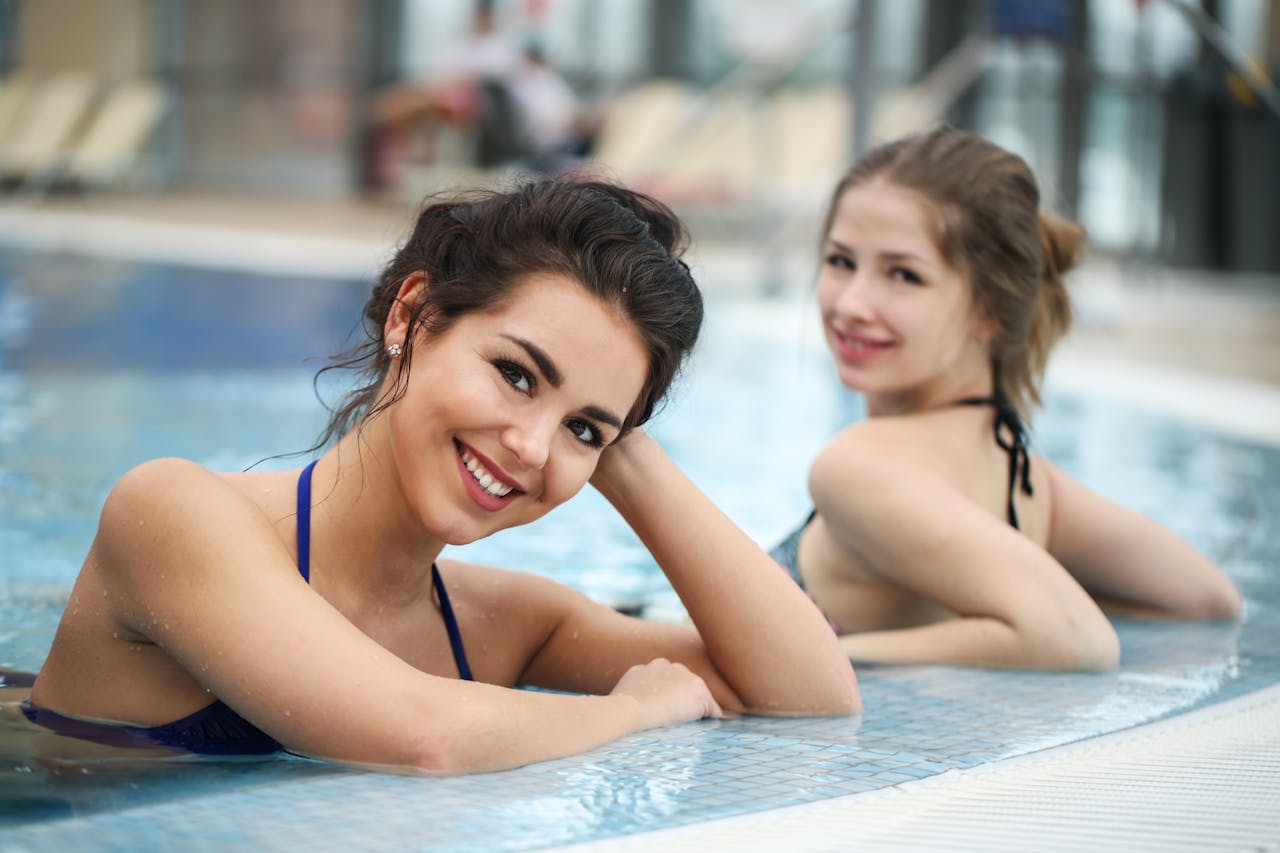
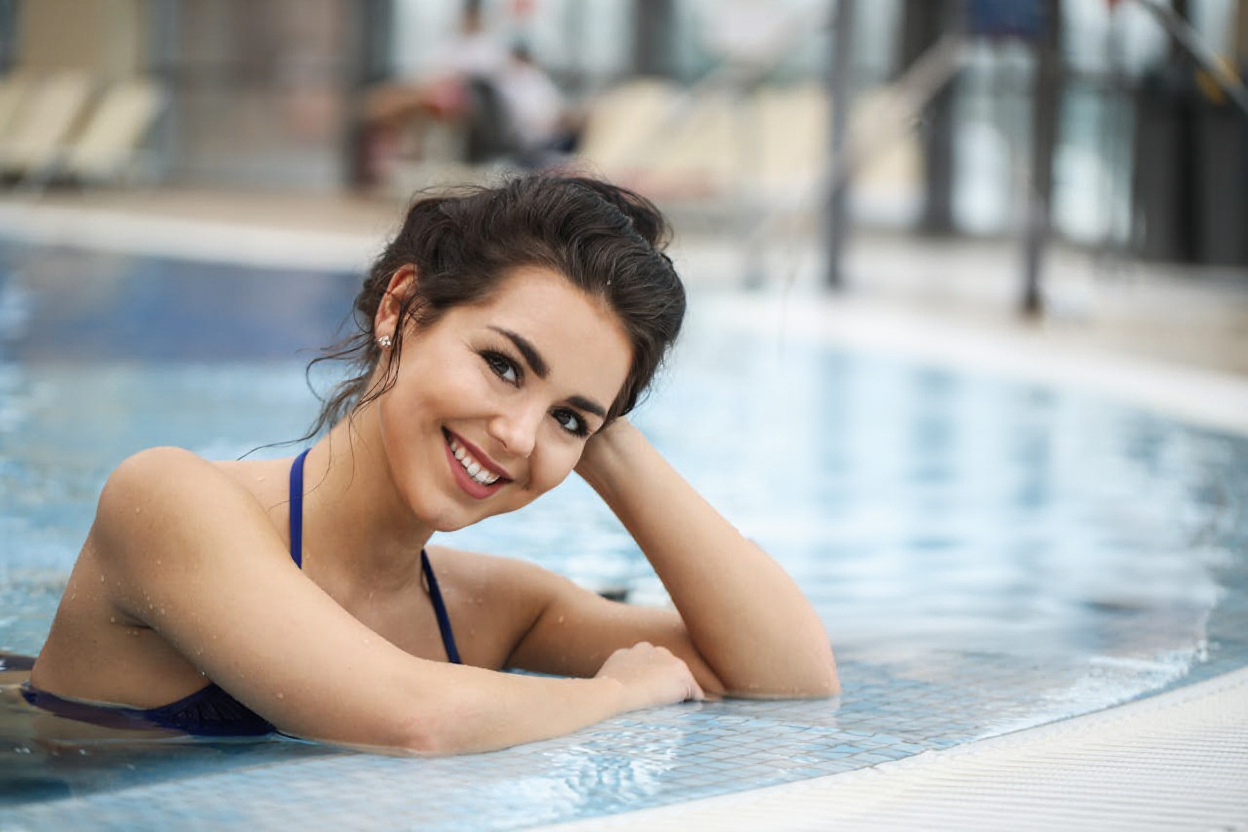
Αφαίρεση ατόμου φόντου
Αφαιρέστε έξυπνα άτομα από το φόντο για να τονίσετε το κύριο θέμα.
Όλα τα παραδείγματα που υποβάλλονται σε επεξεργασία με χρήση της τεχνητής νοημοσύνης μας αφαιρούν το άτομο από την τεχνολογία φωτογραφίας. Τα πραγματικά αποτελέσματα ενδέχεται να διαφέρουν ανάλογα με την ποιότητα της εικόνας και την πολυπλοκότητα του ατόμου.
Ιδανικό για κάθε σενάριο
Αφαιρέστε άτομο από τη φωτογραφία για οποιονδήποτε σκοπό
Ταξιδιωτική Φωτογραφία
Αφαιρέστε τουρίστες και αγνώστους από τις ταξιδιωτικές σας φωτογραφίες. Λάβετε καθαρές λήψεις από αξιοθέατα χωρίς πλήθη.
Ακίνητα
Διαγράψτε άτομα από φωτογραφίες ακινήτων για καταχωρήσεις επαγγελματικών ακινήτων.
Φωτογραφία προϊόντος
Διαγράψτε άτομα από το φόντο για να επισημάνετε τα προϊόντα σας σε φωτογραφίες ηλεκτρονικού εμπορίου.
Οικογενειακές Φωτογραφίες
Αφαιρέστε τα ανεπιθύμητα άτομα από τις οικογενειακές φωτογραφίες και διατηρήστε ιδιαίτερες αναμνήσεις.
Μέσα κοινωνικής δικτύωσης
Δημιουργήστε καθαρές, επαγγελματικές φωτογραφίες για το Instagram, το Facebook και άλλες πλατφόρμες κοινωνικής δικτύωσης.
Συχνές Ερωτήσεις
Συνήθεις ερωτήσεις σχετικά με την αφαίρεση ατόμων από φωτογραφίες
Πώς η τεχνητή νοημοσύνη αφαιρεί άτομο από τη φωτογραφία;
Είναι πραγματικά δωρεάν η αφαίρεση ατόμου από τη φωτογραφία;
Ποιες μορφές εικόνας υποστηρίζονται;
Πόσος χρόνος χρειάζεται για να αφαιρέσετε ένα άτομο από μια φωτογραφία;
Μπορώ να αφαιρέσω πολλά άτομα από μία φωτογραφία;
Θα επηρεαστεί η ποιότητα της εικόνας;
Είναι τα δεδομένα της φωτογραφίας μου ασφαλή και ιδιωτικά;
Χρειάζεται να εγκαταστήσω κάποιο λογισμικό;
Συχνές ερωτήσεις χρέωσης εικόνων
Γρήγορη εξήγηση για το πώς μετριέται και χρεώνεται η επεξεργασία εικόνων
Ξεκινήστε να αφαιρείτε άτομα από τις φωτογραφίες τώρα
Δωρεάν, Γρήγορη, Ασφαλής - Κάντε τις φωτογραφίες σας Τέλειες