
FreeRepair: A Truly Free Open-Source AI Watermark Remover – Remove Image Imperfections in One Click
FreeRepair: A Truly Free Open-Source AI Watermark Remover – Remove Image Imperfections in One Click
Downloading images from the web often means dealing with watermarks — platform stamps, stock photo credits, or copyright marks. In the past, removing these required Photoshop's Clone Stamp or Content-Aware Fill: tedious steps with inconsistent results. In 2026, the open-source community released FreeRepair, a completely free, AI-powered local watermark removal tool that needs no registration, no internet connection, and works with one click.
What Is FreeRepair
FreeRepair is an image repair tool built on Python Django with the LaMa inpainting model (based on the IOPaint / Lama Cleaner ecosystem). It combines three core capabilities: AI watermark removal, batch processing, and image enhancement.
Unlike most online watermark removers that upload your images to the cloud, FreeRepair processes everything locally on your machine — ensuring privacy, faster speeds, and unlimited usage.
Project Details:
- GitHub: freesoftwaretool/freerepair (Apache-2.0 license)
- Download: SourceForge (FreeRepair V2.1.1, ~944 MB)
- Platform: Windows (double-click FreeRepair.bat to launch)
- Core Technology: IOPaint (formerly Lama Cleaner) + LaMa inpainting model
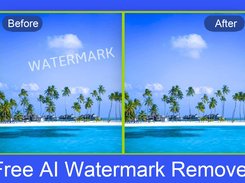 FreeRepair watermark removal comparison: original image (left) vs AI-cleaned result (right)
Three Core Features
1. AI Watermark / Object Removal
FreeRepair uses a paint-to-remove interaction: simply brush over the watermark area, and the AI analyzes surrounding pixels to intelligently reconstruct what lies underneath.
What it can remove:
- Copyright watermarks and logos in image corners
- Unwanted people or objects from photos
- Text overlays from images
- Timestamps, date marks, and signatures
The AI fills are remarkably natural, leaving almost no visible trace of the modification.
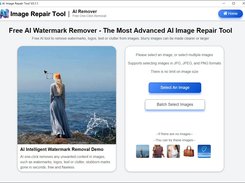 FreeRepair's clean Web UI: upload an image and paint over watermark areas
2. Batch Processing
When you need to process large numbers of images, FreeRepair supports batch import and automatic processing. Select an entire folder of images — the tool identifies watermark regions and processes them all at once, exporting high-definition lossless results.
This is especially useful for e-commerce sellers who need to clean uniform watermarks from product photos in bulk.
3. Image Enhancement
Beyond watermark removal, FreeRepair includes image sharpening and upscaling capabilities:
- Sharpen blurry images: AI analyzes blur areas and restores detail
- Upscale: Supports 2x and 4x enlargement, maintaining quality through repeated upscaling
- Combined repair: Apply watermark removal and enhancement in one workflow
An old photo that's both watermarked and blurry? Remove the watermark first, then enhance — two steps, one tool.
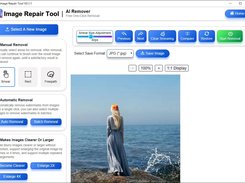 FreeRepair's editing interface: supports brush painting, undo/redo, and preview
How to Install and Use FreeRepair on Windows
Installation requires zero technical knowledge — no command line, no Python configuration.
Download and Extract
- Visit the SourceForge project page (freerepair.sourceforge.io)
- Download FreeRepair-V2.1.1.zip (~944 MB, includes complete runtime environment)
- Extract to any folder — you get a FreeRepair directory
- Do not modify any files inside the folder
Launch
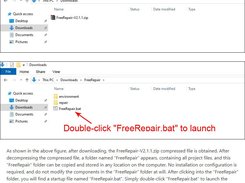
Enter the FreeRepair folder and double-click FreeRepair.bat.
This launches a local web server and automatically opens your browser to FreeRepair's Web UI. The AI model takes a few dozen seconds to load initially, after which the tool is ready to use — no internet connection required.
Usage Steps
- Click "Upload Image" to select your image
- Paint over the watermark area (adjustable brush size)
- Click "Remove" — AI processes automatically
- Preview the result, export when satisfied
For videos with watermarks, you can export frames as images, batch-process with FreeRepair, then recombine into video.
Comparison with Similar Tools
| Tool | Price | Internet Required | Open Source | Batch | Enhancement |
|---|---|---|---|---|---|
| FreeRepair | Free | No | ✅ Open Source | ✅ | ✅ |
| IOPaint | Free | No | ✅ Open Source | ✅ | ❌ |
| HitPaw | ~$30/month | Yes | ❌ | ✅ | ✅ |
| WatermarkRemover.io | $10/month | Yes | ❌ | ❌ | ❌ |
| Photoshop | ~$25/month | Yes | ❌ | ❌ | ✅ |
 FreeRepair's feature listing: AI watermark removal, batch processing, and image enhancement all in one
FreeRepair's key advantage: completely free + local processing + open source + no registration. Its watermark removal quality, powered by the mature LaMa inpainting model, matches paid tools.
Best Use Cases
- Content creators: Clean stock image watermarks from thumbnails and covers
- E-commerce sellers: Batch process product photos with uniform watermarks
- Photographers: Remove unwanted objects or markers from photos
- Students & researchers: Extract clean charts and figures from academic reports
- Everyday users: Clean up watermarked images downloaded from social platforms
⚠️ Important Legal Note
Use legally and responsibly. FreeRepair is a legitimate tool, but how you use it matters:
- Only process images you own the rights to
- Do not remove copyright watermarks from others' work (this is copyright infringement)
- Free-tier AI assets may have their own terms — check before commercial use
- Educational and personal learning purposes are generally acceptable
Summary
FreeRepair is one of the rare free open-source tools that combines watermark removal, image enhancement, and batch processing in one package. Its biggest advantages:
- Zero learning curve: Download, extract, double-click — no technical background needed
- Local processing: No cloud upload, fast speed, complete privacy
- Truly free: Apache-2.0 open source, no hidden fees
- All-in-one: Watermark removal + batch processing + image enhancement
If your work frequently involves cleaning watermarked images, FreeRepair is a tool worth keeping in your arsenal. Download it once and it's yours forever — no subscription worries, no service shutdowns.
Published July 9, 2026. Tool version: FreeRepair V2.1.1. Open-source tools may update frequently — always get the latest version from official sources.